ShiftWink: Scheduling, hour tracking, and income reporting for shift workers
Schedules rotating shifts, logs clock-in/out times, and projects earnings across multiple jobs in one place, including pay rules for overtime and deductions. ShiftWink from Externum LLC runs on Android and targets shift-dependent professionals. The app combines calendar-based planning, actual-hours tracking with pay-stub image import, and home-screen widgets for quick schedule views, making it suitable for healthcare staff, retail workers, gig drivers, and freelancers who need precise shift-to-pay visibility.
What the app does day to day for shift workers
ShiftWink focuses on shift planning and pay tracking by letting you enter day/night shifts, repeating rotations, and multiple income sources. The tool records planned shifts in a calendar and stores actual hours via clock-in/out, producing paycheck history. Pay rules accept fixed rates, variable earnings, premiums, and deductions so scheduled work translates to projected income without manual spreadsheets.
How it structures the core workflow and produces outputs
Planning to payroll is a single workflow: create shifts, assign rates or premiums, optionally import pay-stub images that the app parses, then generate reports. Export options include PDF and CSV, and the app shows planned-versus-actual comparisons. Widgets place upcoming shifts on the Android home screen, so the schedule and reported earnings stay visible outside the app.
Interface, onboarding, and required familiarity
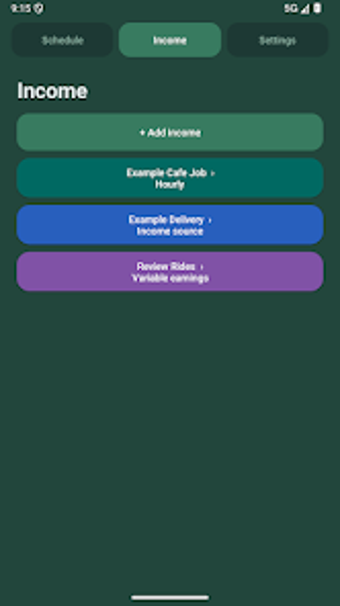
Interface choices reduce initial friction through color-coded income sources, light/dark themes, and templates for repeating rotations. You can start without an account since local data storage is supported, and optional cloud sync exists for cross-device use. Pay-stub field recognition speeds data entry, but configuring complex pay rules requires attention to percentages and fixed deduction fields.
File compatibility, offline use, and reliability for business records
Records and exports support practical bookkeeping: the app exports calendars and yearly summaries in PDF or CSV and stores backups locally, which suits personal record-keeping and tax preparation. Offline planning is supported, and optional cloud uploads exist for synchronization. The paycheck history and report views keep a traceable record of planned and actual earnings for multiple jobs.
Who should adopt ShiftWink and what trade-off it implies
ShiftWink suits professionals who need integrated scheduling plus income visibility, especially those juggling multiple jobs or irregular rotations. The app delivers precise shift-to-earnings tracking and exportable records, but getting pay rules set exactly requires careful initial configuration. For users who want a single Android tool to turn shifts into auditable income summaries, ShiftWink performs as a focused, privacy-minded option.